


There is no single best Instagram automation tool. There is a best one for a brand answering 30 “price” comments a day, a different one for a creator who wants a lead magnet running in ten minutes, and a different one again for a team that needs branching conversations across several channels.
This list compares five tools by who each one suits. One of them, AutoPubliX, is ours, and we have put it where it fits rather than at the top by default. Features and pricing change often, so use this as a shortlist and verify the details on each vendor’s own page and free trial.
What We Mean by “Instagram Automation”
In this guide, an Instagram automation tool does repeatable work on your own account using rules you define:
- replying when someone comments a keyword on a post or reel
- sending a DM when someone engages with specific content
- following up with people who started a conversation and went quiet
- tagging and organizing contacts by what they asked about
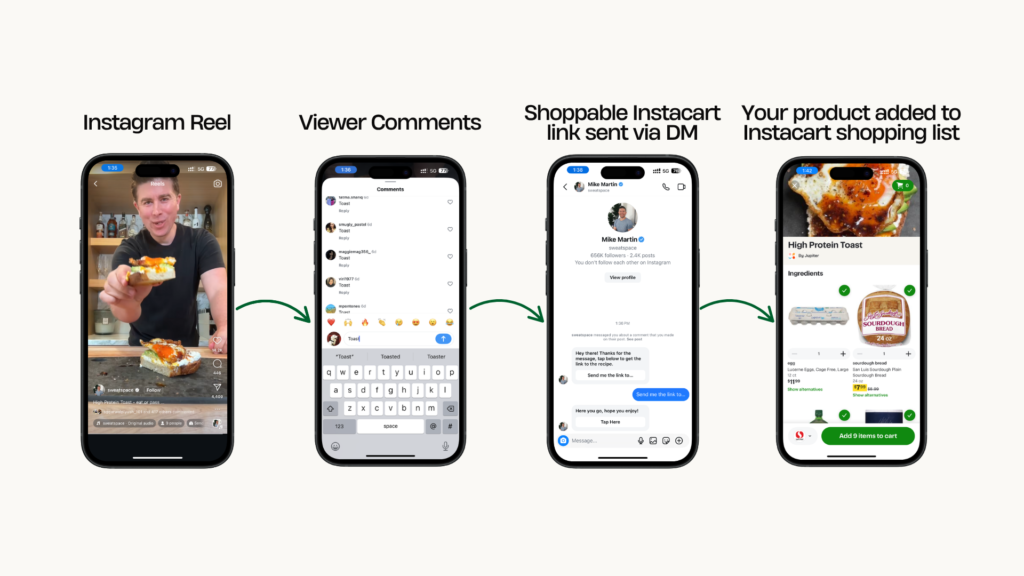
It does not follow, like or comment on other people’s content to grow your audience. Those are growth bots, they fall outside Instagram’s official API, and they are a different, riskier product. See DM bot vs real automation for the difference.
How to Judge Any Tool on This List
Run these six checks on each free trial. They matter more than any feature list.
- How it connects. It should send you to Meta’s own authorization screen. If it asks for your Instagram password, stop.
- Time to the first working flow. Set up one comment-to-DM flow and time it.
- How easy it is to edit. Can you change a trigger or a reply in two clicks?
- What happens when it can’t answer. The conversation should reach a person with the history attached.
- What you can see afterwards. Tags, which flows fired, which replies got answers.
- The real cost. Note what is limited by plan: contacts, accounts, flows or AI usage.
The 5 Tools
1. AutoPubliX
Best for: brands and creators who want comment-to-DM automation and content scheduling in one dashboard.
AutoPubliX is built around the comment-to-DM workflow. A keyword comment can trigger a relevant direct message, helping businesses manage customer interactions.
It also offers AI-assisted caption and hashtag drafting, scheduling, and analytics.
Check the current AutoPubliX product documentation to confirm the available integrations and features before publishing these claims.
Consider something else if: you need a very large, branching, multi-channel conversation builder, or you only want free tools.
See the Instagram automation feature page for the full list.
2. ManyChat
Best for: teams that need complex, multi-step conversational flows across several channels.
ManyChat is one of the more established names in DM automation, with a visual flow builder that handles branching logic. If you need qualification flows with many paths, it is built for that. The trade-off to check is setup time: richer flow builders take longer to learn and maintain.
On its current pricing page, ManyChat’s Free plan covers 25 active contacts. Paid plans start at $14/month (Essential), with higher tiers at $29, $69, and $139/month.
Pricing depends on the number of active contacts you interact with each month. Additional charges may apply when you exceed your plan’s contact limit.
Instagram, Facebook Messenger, TikTok, and Telegram are included on all plans. WhatsApp and SMS are available starting with the Pro plan.
ManyChat also offers AI-powered DM replies and FAQ responses on Pro and higher plans.
Its pricing page lists scheduled messages and broadcasts, but not social media post scheduling. Businesses that want to schedule Instagram posts may need a separate scheduling tool.
Prices are in USD and were checked in October 2026.
Direct comparison: AutoPubliX vs ManyChat.
3. InstaChamp
Best for: creators and small brands who want keyword DM automation with a unified inbox, including on Facebook.
InstaChamp, now part of Customers.ai (formerly MobileMonkey), focuses on DM automation for Instagram and Facebook.
Its listed features include keyword-based DM automation, story mention auto-replies, lead capture, a unified live chat inbox, drip campaigns, contact export to Google Sheets, VIP lists and segmentation, and multi-account support for several Instagram and Facebook pages. Pricing is listed as on request, so you will need to contact the vendor for a quote. These details come from a third-party software listing, so confirm them, along with AI features and comment-to-DM support, with the vendor before you decide.
Direct comparison: AutoPubliX vs InstaChamp.
4. RapidDM
Best for: creators and small accounts that want low-cost comment-to-DM automation on one to three Instagram accounts.
RapidDM is a focused, low-priced comment-to-DM tool. Its features include keyword triggers that send links, products or booking pages, story reply automation, welcome messages, follow-up DMs on timed delays, and product carousels.
On its current plans page, the Free plan includes 1,000 automated DMs a month on one Instagram account. Starter is $9/month (10,000 DMs, one account), and Pro is $19/month (unlimited DMs, up to 3 accounts, timed follow-ups, AI comment replies and message variations). It describes analytics only as click tracking on a dashboard, and it does not list contact segmentation or post scheduling. Prices are in USD, monthly billing, checked in October 2026.
Direct comparison: AutoPubliX vs RapidDM.
5. Zorcha
Best for: creators and brands who want DM automation plus link-in-bio, forms and AI FAQ replies in one tool, on Instagram and Facebook.
Zorcha pairs Instagram and Facebook DM automation with a flow builder, an AI FAQ assistant, audience tools such as segments and broadcasts, and extras like link-in-bio pages and forms.
On its current pricing page, plans start with a Free tier, then Pro at $14.99/month, Ultimate at $39.99/month and Business at $109.99/month (monthly billing, lower when billed annually). Automations, DMs and contacts are listed as unlimited on every plan, with the limits applying to AI credits and AI FAQs. Segments start on Pro, and broadcasts start on Ultimate. Its page lists Instagram and Facebook as channels and does not mention WhatsApp or others. Prices are in USD, checked in October 2026.
Direct comparison: AutoPubliX vs Zorcha.
Free Options to Try First
If your volume is low, try Instagram’s and Meta’s built-in tools before paying for anything. Meta Business Suite and Instagram’s inbox offer basic features such as saved replies and instant or away messages, and Instagram can schedule posts natively for professional accounts. They do not run keyword-triggered comment-to-DM flows with tagging, so they stop being enough when you are copying the same answer many times a day. Check Meta’s current feature list, as it changes.
Quick Picks by Situation
| If you are… | Look at |
|---|---|
| One account, want a working flow fast | RapidDM or AutoPubliX’s free trial, compared side by side |
| A brand with growing DM volume and a need to tag leads | AutoPubliX, or any tool that passes the six checks above |
| Building complex branching flows, possibly across several channels | ManyChat |
| Wanting DM automation plus link-in-bio and forms | Zorcha |
| Wanting a low-cost start on one to three accounts | RapidDM |
| Wanting scheduling and comment-to-DM in one place | AutoPubliX |
| Very low volume | Meta’s built-in tools first |
This table is a starting point, not a ranking. The right choice depends on what your trial shows.
A Typical Setup, Whichever Tool You Pick
- Connect your Instagram professional account through Meta’s authorization screen.
- Choose one post that already gets questions in the comments.
- Pick two or three trigger words your audience already uses, such as “price,” “info” or “link.”
- Write the DM in your own voice: one screen of text, a clear next step, and a way to reach a person.
- Test with a second account, including typos and odd phrasing.
- Turn it on and read the conversations daily for the first week.
For a full walkthrough, see Instagram DM automation tool: how to choose one and set it up and the comment-to-DM beginner’s guide.
Safety: The Check That Matters Most
Whatever you choose, confirm it uses Instagram’s official API and Meta’s authorization screen. Tools that ask for your password, log in from servers elsewhere or promise automatic follower growth are the ones that lead to action blocks and restrictions. Read is Instagram automation safe and how to automate Instagram DMs without violating Meta’s policies before you connect an account.
Mistakes to Avoid
Choosing by price alone. Compare what each plan includes, such as contacts, accounts and AI usage, not just the starting price.
Automating everything. Fully scripted replies feel robotic. Keep a human option in every flow.
Stacking tools. Running several automation tools on the same account for overlapping jobs creates more to manage and more unusual activity.
Expecting it to fix weak content. Automation speeds up replies. It does not make people want what you are selling.
Never reviewing. Prices change, offers end and questions shift. Review what fires and converts at least monthly.
FAQs
What is the best Instagram automation tool for beginners?
One with a simple setup and clear comment-to-DM automation, not a complex flow builder. Try two on their free trials and see which you set up faster.
Are Instagram automation tools safe?
Tools built on Instagram’s official API with Meta’s authorization screen are the sanctioned route. Tools that ask for your password or use unofficial access carry a real risk of restrictions.
Will an automation tool get my account restricted?
Not because of using an official-API tool. Risk comes from unofficial access and from bulk outbound activity like auto-follow and auto-like.
Want to try comment-to-DM automation with scheduling in one place? See how

