


A coffee roaster posts a Reel of a new single-origin bag. Within an hour, forty people comment “price” or “link.” The owner is on a delivery run. By the time she opens Instagram that evening, half the commenters have scrolled on and the rest get a reply that feels late.
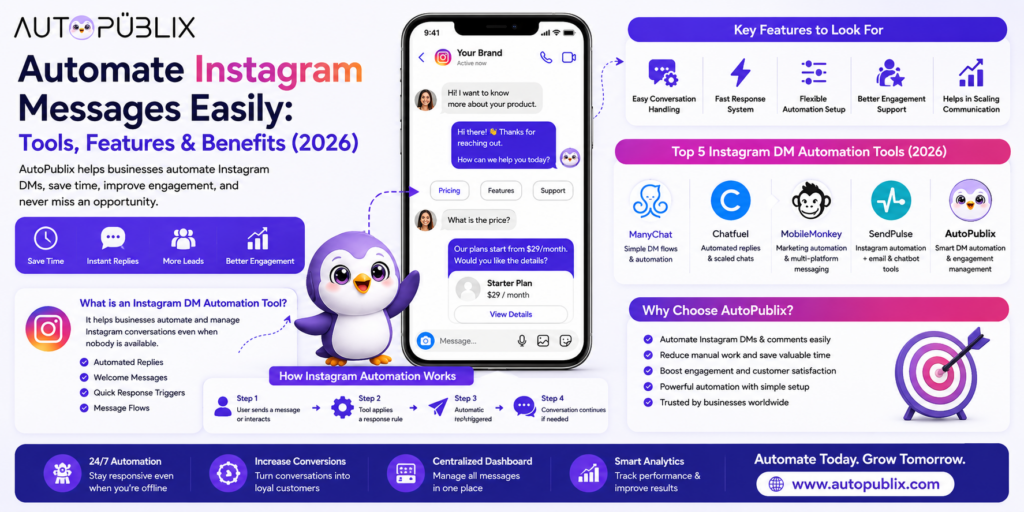
An Instagram DM automation tool exists for that evening. It watches for the comment or message, sends the reply you wrote in advance within seconds, and hands the conversation to you if the customer needs a person.
This guide explains what these tools do, walks through one example from trigger to reply, shows what to check before picking one, covers Meta’s rules, and gives you a one-hour setup plan.
What an Instagram DM Automation Tool Does
It sends messages on your own account based on rules you set. It does not run your account for you, and it does not hold conversations on its own judgment. It handles four repeatable jobs:
- Instant replies: a response the moment someone messages you, including outside business hours.
- Welcome messages: a first message to someone who writes to you for the first time.
- Keyword triggers: a specific reply when a message or comment contains a word you chose, like “price,” “info” or “link.”
- Short flows: a few automated steps that lead someone to an answer, a link or a handoff to a person.
If you want the line between this and risky tools drawn clearly, see Instagram DM bot vs real automation.
One Example, Start to Finish
Here is the roaster’s setup, in the order it runs.
Trigger: any comment containing “link” or “price” on the Reel.
Step 1: The tool sees the comment. It matches the keyword and checks that this person has not already received this offer, so nobody gets the same DM twice.
Step 2: It sends a DM within seconds.
Hi Arjun! Here’s the single-origin bag from the Reel: 250 g for ₹650, free shipping over ₹999. Order here: [link]. Want me to suggest a grind size? [Yes please] [Just the link is fine]
Step 3: It branches on the reply. If he taps “Yes please,” the tool asks espresso or filter, then sends the matching grind guide. If he taps “Just the link,” it stops there.
Step 4: It tags the conversation “price enquiry – single origin” so the owner can filter by it later.
Step 5: A person steps in only if needed. If Arjun types “can I change my address after ordering?” the flow does not know the answer, so it flags the conversation for the owner instead of guessing.
The customer got a fast, specific answer. The owner saw a tagged list of warm leads in the morning instead of forty untouched comments. You can build this exact pattern from our comment-to-DM beginner’s guide and the Instagram DM automation workflows post.
What to Check Before You Choose a Tool
Most tools look similar on a features page. These five checks separate them.
1. How it connects to your account. A legitimate tool sends you to Instagram’s or Facebook’s own permission screen. If it asks you to type your Instagram password into its own form, walk away. See how to automate Instagram DMs without violating Meta’s policies for how to verify this.
2. What it promises. “Reply to comments and DMs on your own account” describes DM automation. “Get followers automatically” or “auto-follow and auto-like” describes a growth bot. Those are different products and carry very different risk.
3. How easy it is to change rules. You will not get the first version right. Check that you can edit a trigger or a reply in two clicks, not through a support ticket.
4. How it handles the handoff. Ask where a conversation goes when the bot cannot answer. The good answer is “to your inbox with the history attached.” The bad answer is “it keeps trying.”
5. What you can see afterwards. Can you filter conversations by trigger or tag, see which keywords fire most, and tell which flows get replies? Without that, you are guessing.
Beyond those, compare tools on the thing you will use most. A tool built mainly for general chatbots across many channels suits a team that wants one system for everything. A tool built around Instagram suits a business whose customers mostly arrive through Instagram comments and DMs. Which one is “better” depends on your channels, so test the one you are considering with your own use case during the free trial.
Meta’s Rules You Need to Know
Two rules affect how you build flows.
The official connection. Automation should run through Instagram’s official API using Meta’s authorization screen. That is the sanctioned route, and it is what separates a DM automation tool from a bot that logs in as you. Our safety guide to auto-posting explains the difference in more detail.
The messaging window. Meta limits when a business can message someone automatically. In general, you can reply freely for a limited period after the person last interacted with you, such as commenting or sending a message, and what you can send outside that period is restricted. Build flows as responses to someone who just reached out, not as cold outreach. Check Meta’s current messaging policy for the exact terms before you plan any follow-up sequence, as they have changed over time.
How AutoPubliX Fits
AutoPubliX is built around Instagram engagement: comment-to-DM automation, AI-personalized replies, built-in lead tagging, and content scheduling in the same dashboard, so you do not need a separate tool for posting. It connects through the official Meta API with secure OAuth login, so no password is shared. See the Instagram automation feature page for the full list, AutoPubliX vs ManyChat for a direct comparison, and our roundup of the best Instagram automation tools for the wider field.
Set Up Your First Flow in an Hour
- Connect your Instagram account through the official Meta authorization screen.
- Pick one post that already gets questions in the comments. Do not start with your whole account.
- Choose two or three trigger words your audience already uses. Read your last ten comments to find them.
- Write the DM in your own voice. One screen of text, a clear next step, and an easy way to reach a person.
- Add a welcome message for first-time senders, separate from keyword replies.
- Test with a second account. Try the odd cases: a typo, an emoji, a different language, the word inside a longer sentence.
- Turn it on and read the conversations daily for the first week. Real messages will show you what to add.
Where It Works Best
- Comment-to-DM lead capture: someone comments “price” and gets the details and a link, with no one on your team touching it.
- Repeated questions: shipping times, opening hours, how something works.
- Welcome messages: a short, human first message to new contacts.
- Story replies: people replying to a Story with a keyword get an answer instead of silence.
- Re-engagement: a follow-up to someone who went quiet, within the messaging window.
Choosing Trigger Words That Actually Fire
Triggers fail more often because of the word than because of the tool.
- Use words people already type. Check your recent comments. If followers write “price” or “how much,” use those. A made-up keyword like “SPARKLE” works only if your post asks for it.
- Cover variations. “Price,” “prices,” “pricing” and “how much” should all lead to the same reply. Misspellings are common, so include a few.
- Keep triggers specific to the post. The word “link” on a giveaway post and “link” on a product post mean different things. Set one flow per post type, not one global rule.
- Avoid single common words. A trigger like “yes” or “ok” will fire on conversations that have nothing to do with your offer.
- Ask for the keyword in the post. “Comment GUIDE and I’ll send it” gives you clean triggers and a clear promise for the customer to expect.
How to Tell If It Is Working
You do not need a complicated dashboard. Check four things weekly for the first month:
- Reply rate: the share of people who answered your first DM. A low rate usually means the first message does not give a clear next step.
- Handoff rate: how often people ask for a person or the flow flags a conversation. A high rate means the bot is missing common questions. Add them.
- Leads captured: conversations that ended with a contact detail or a click on your link.
- Response time on handoffs: how fast your team answers the conversations the flow passed on. Automation does not help if the handoff waits a day.
Read ten real conversations each week. The questions the flow could not answer are your list of what to build next.
Mistakes That Make It Worse
One reply for every trigger. A “price” comment and a “how do I use this” message are different questions. Give each its own reply.
Skipping the test. Flows that were never tested send the wrong answer to the exact messages you did not imagine.
No human path. A customer who is stuck in a loop of buttons leaves. Always include “talk to a person” and make sure someone answers.
Setting it and forgetting it. Prices change and promotions end. Review which triggers fire and which conversations stall at least monthly.
Choosing a tool by price alone. A cheap tool that asks for your password can cost you the account. Check how it connects first.
FAQs
What is an Instagram DM automation tool?
Software that replies to Instagram messages and comments based on rules you set, handling repeated questions and first responses so you do not have to reply to everything manually.
Is Instagram DM automation safe for my account?
Yes, when the tool connects through Instagram’s official API with Meta’s authorization screen, as AutoPubliX does. Tools that ask for your password or use unofficial access carry a real risk of restrictions.
What is the difference between DM automation and a chatbot?
The terms overlap. DM automation usually means Instagram-specific reply and lead-capture workflows. “Chatbot” often means a branching conversation builder used across several channels.
Can automation handle every conversation?
No, and it should not try. It handles predictable questions well. Anything that needs judgment or negotiation should go to a person.
Want to turn Instagram comments and messages into organized conversations? See how AutoPubliX works — start your 14-day free trial, no payment today.

