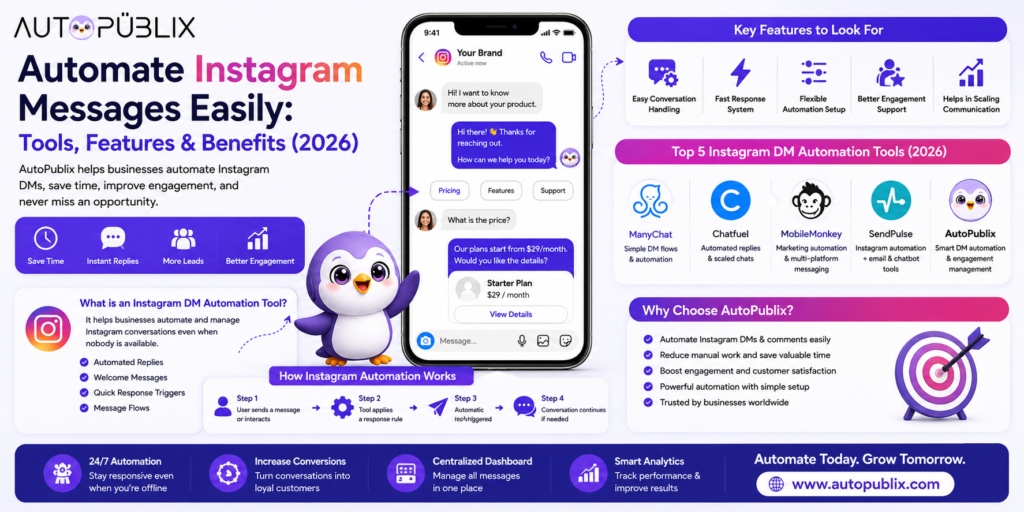
When Instagram messages start coming in regularly, replying to each one manually stops being realistic — especially when people expect a response within minutes, not hours. An Instagram DM automation tool solves this by handling replies, welcome messages, and follow-ups automatically, so conversations keep moving even when nobody’s actively watching the inbox.
This guide covers what an Instagram DM automation tool actually does, how the setup works step by step, what to look for before choosing one, and how AutoPubliX compares to other options on the market.
What Is an Instagram DM Automation Tool
An Instagram DM automation tool handles messages on your behalf using rules you define — it doesn’t run your account independently, and it doesn’t replace real conversations. It handles the specific, repeatable parts:
- Automated replies — a response sent the moment someone messages, even outside business hours
- Welcome messages — a first message sent automatically when someone messages you for the first time
- Keyword-triggered replies — a specific response sent when a message or comment contains a defined word (like “price,” “info,” or “link”)
- Message flows — a short sequence of automated steps that guides someone toward an answer, a link, or a handoff to a real person
For most businesses, this means no message goes unanswered for hours, and no one needs to sit and monitor DMs constantly. See AutoPubliX’s Instagram automation tool for how this is implemented in practice.
How Instagram DM Automation Actually Works
The mechanics are simpler than they might seem — once set up, the flow runs on its own:
Step 1: A user sends a message or comments on a post. The system detects the interaction automatically, whether it’s a direct message, a comment, or a reply to a story.
Step 2: The tool checks it against your automation rules. It looks for a matching trigger — a keyword, a first-time sender, or a specific type of interaction — and determines which response applies.
Step 3: An automatic reply is sent. The matching response goes out immediately, without anyone needing to be online to send it manually.
Step 4: The conversation continues if needed. Depending on how the flow is built, the tool can ask a follow-up question, share a link, or flag the conversation for a team member to take over — automation handles the first response, but it doesn’t have to handle everything after that.
This same basic structure underlies most DM automation tools; the differences between them come down to how flexible the rules are and how well the tool organizes the resulting conversations. For a deeper walkthrough of building a specific flow, see Instagram DM automation workflows.
Key Features to Look For
Easy conversation handling. The tool should make replying feel more organized, not add another layer of complexity to manage.
Fast response triggers. Replies need to go out immediately — a delayed automated reply defeats the purpose.
Flexible rule setup. You should be able to adjust triggers and responses easily as you learn what your audience actually asks, not just at initial setup.
Natural-feeling replies. Automation that sounds obviously scripted can hurt trust — look for tools that support enough personalization that responses don’t feel robotic.
Scalability. As message volume grows, the tool needs to keep conversations organized rather than turning into a harder-to-manage inbox than a manual one would be.
Compliance with Meta’s policies. This is non-negotiable — a tool that isn’t built on Instagram’s official API risks account restrictions regardless of how good its automation looks. See how to automate Instagram DMs without violating Meta’s policies for specifics.
AutoPubliX vs. Other DM Automation Tools
Several tools offer some form of Instagram DM automation, each with a different focus:
| Tool | Instagram-first design | AI-personalized replies | Lead tagging | Content scheduling |
|---|---|---|---|---|
| AutoPubliX | Yes | Yes | Yes, built-in | Yes |
| ManyChat | No — multi-platform chatbot focus | No | Yes | No |
| Chatfuel | No — broad chatbot platform | Limited | Limited | No |
| MobileMonkey | No — general marketing automation | No | Yes | No |
| SendPulse | No — bundles email, chat, Instagram | Limited | Limited | Limited |
The distinction that matters most: ManyChat, Chatfuel, MobileMonkey, and SendPulse are general-purpose messaging or marketing automation platforms with Instagram support added on. AutoPubliX is built specifically around Instagram engagement — from comment to DM to lead — with content scheduling included in the same dashboard, so there’s no need to run a separate tool for publishing. See the full Instagram automation tools comparison and AutoPubliX vs. ManyChat for a detailed breakdown.
Setting Up Your First DM Automation Workflow
A basic first workflow typically takes under an hour to set up:
- Connect your Instagram account via the official Meta API (never share your password with a tool that asks for it directly)
- Define your triggers — start with 2–3 common keywords people already comment or message about (e.g., “price,” “info”)
- Write your automated responses — keep them short, natural, and include a clear next step (a link, a question, or an offer to connect with a human)
- Set up a welcome message for first-time senders, separate from keyword-triggered replies
- Test the flow before turning it on fully — send a few test messages to confirm triggers fire correctly
- Review and adjust weekly — check which triggers are firing most and refine responses based on actual conversations, not assumptions
For a beginner-friendly walkthrough of the comment-to-DM setup specifically, see Instagram comment-to-DM automation: the complete beginner’s guide.
Staying Compliant with Meta’s Policies
Not every automation approach is safe for your account. Tools that rely on password-sharing or unofficial bot access — rather than Instagram’s official Meta API — carry real risk of account restrictions or bans, regardless of how well the automation itself performs.
AutoPubliX connects exclusively through the official Meta API with secure OAuth login, meaning no passwords are shared and automations run within Instagram’s approved guidelines. For the full policy breakdown, see how to automate Instagram DMs without violating Meta’s policies.
Common Use Cases
Lead capture from comments. Someone comments “price” on a post → gets an instant DM with pricing info and a link, without your team touching it.
FAQ handling. Repeated questions (shipping times, business hours, how something works) get answered instantly instead of piling up in the inbox.
Welcome sequences. New followers or first-time DM senders get a friendly intro message, setting the tone before a real conversation starts.
Re-engagement. Conversations that went quiet get a follow-up message instead of being forgotten entirely.
Story reply automation. Replies to your Instagram Stories trigger automated responses, capturing engagement that would otherwise go unanswered.
Benefits of Automating Instagram DMs
Faster response times. Automated first replies go out in seconds instead of whenever someone next checks the inbox — often the difference between capturing a lead and losing them to a slower-responding competitor.
Fewer missed messages. As volume grows, manual inboxes inevitably lose track of conversations. Automation ensures every message gets at least an initial response.
More consistent tone. Automated replies follow the same script every time, which means customers get a consistent experience regardless of who (or what) is technically answering.
Freed-up team time. Repeated questions — pricing, hours, shipping, availability — get handled automatically, leaving your team’s time for conversations that actually need a person.
Better lead organization. Tagging and categorizing conversations by trigger (pricing inquiry, support question, general interest) makes follow-up campaigns and sales handoffs far easier than sorting through an undifferentiated inbox.
Mistakes to Avoid When Automating DMs
Making replies too generic. A single canned response for every trigger starts to feel robotic fast — build in enough variation and personalization that automated doesn’t mean impersonal.
Automating without testing first. Turning on a flow without testing it against real message variations (typos, different phrasing, multiple languages) can produce replies that don’t actually match what was asked.
Never reviewing performance. Automation isn’t “set once and ignore forever” — checking which triggers fire most, and which conversations stall out, is how the setup actually improves over time.
Skipping the human handoff. Not every conversation should stay automated — make sure there’s a clear, easy path for a real team member to step in when a conversation needs judgment automation can’t provide.
Ignoring platform policy. Automation approaches that fall outside Instagram’s official Meta API guidelines put the account itself at risk, not just the quality of replies — see the compliance guide before building anything.
FAQs
What is an Instagram DM automation tool?
Software that automatically replies to Instagram messages and comments based on rules you set — handling repeated questions and first responses without requiring someone to reply manually to every message.
Why do businesses use DM automation on Instagram?
Because manually replying to every message doesn’t scale as an account grows, and delayed responses often mean lost leads. Automation keeps response times fast and consistent regardless of volume.
Is Instagram DM automation safe for my account?
Yes, when the tool uses Instagram’s official Meta API — as AutoPubliX does. Tools that require password-sharing or use unofficial bot access carry real risk of restrictions.
How is AutoPubliX different from ManyChat, Chatfuel, or SendPulse?
Those tools are general-purpose messaging or marketing platforms with Instagram automation added on. AutoPubliX is built specifically for Instagram — combining comment-to-DM automation, lead tagging, and content scheduling in one dashboard. See the full comparison.
How long does it take to set up DM automation? A basic workflow — a few keyword triggers and a welcome message — typically takes under an hour. More advanced flows with multi-step conversations take longer to build and test properly.
Can DM automation handle every conversation? No, and it shouldn’t try to. Automation handles repeated, predictable questions well; conversations that need real judgment or negotiation should still route to a person.
Do I need coding or technical skills to set up DM automation? No — tools like AutoPubliX are built around guided, no-code setup. Defining triggers and writing responses doesn’t require any development experience.
What’s the difference between DM automation and a chatbot? The terms overlap, but “DM automation” typically refers to Instagram-specific reply and lead-capture workflows, while “chatbot” often implies a more complex, branching conversation builder used across multiple channels. Instagram-first tools tend to be simpler to set up for this specific use case than general-purpose chatbot platforms.
Can I use DM automation alongside a real team responding manually? Yes — that’s how most businesses actually run it. Automation handles instant first responses and common questions, while flagged or complex conversations get routed to a team member, rather than automation replacing human replies entirely.
Ready to turn Instagram messages into organized, converting conversations? Start your 14-day free trial — no payment today.