Almost every Instagram bot sales page makes the same three promises: more followers, no effort, and “100% safe.” Only the first two are ever the real product.
The word “bot” is the problem. It covers a tool that answers a customer’s question at 2 a.m. and a tool that follows four hundred strangers before breakfast. They share a name and almost nothing else. If you lump them together, you either avoid the useful tools out of fear or connect the dangerous ones out of hope.
This guide gives you one question that sorts any bot in a minute, then goes through each kind in detail: how it works, how it is sold, what goes wrong, and what to do instead. It covers how Instagram tends to spot automation, the myths that keep people using risky tools, how to grow without a growth bot, and a ten-minute audit to run before you connect anything.
The One Question That Sorts Every Bot
Ask this: who does the bot talk to?
- If it talks to people who already contacted you, by replying to their comment or message, it is an assistant.
- If it talks to people who never contacted you, by following, liking, commenting on or messaging strangers, it is an outbound growth bot.
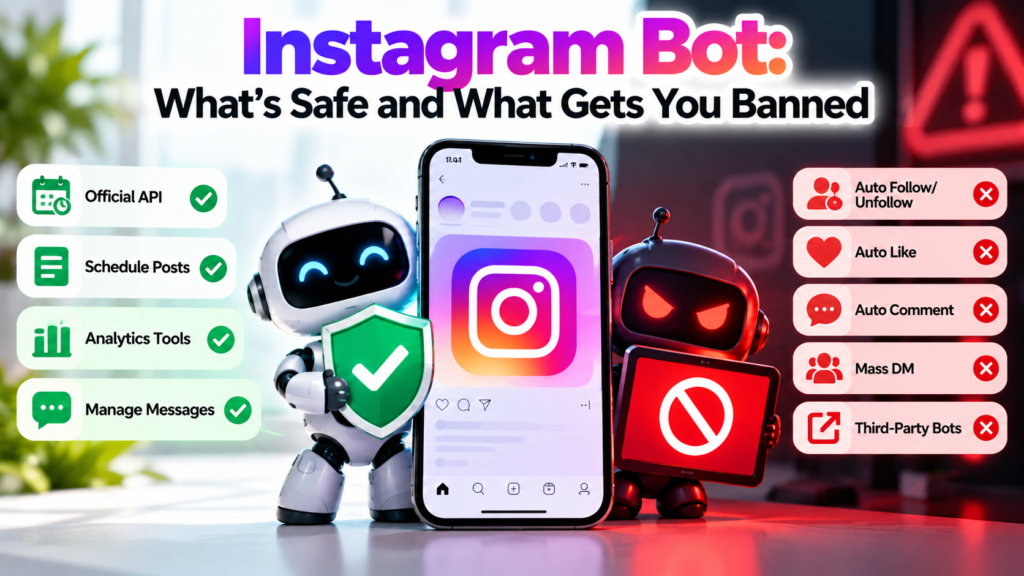
That single question explains most of the risk. Instagram offers an official route for the first kind, built for businesses. For the second there is no official feature at all, so any tool that does it is working around the platform.
| What it does | Who it talks to | Official route? | Risk |
|---|---|---|---|
| Replies to comments on your posts | People who commented | Yes | Low |
| Answers your DMs, sends a welcome message | People who messaged you | Yes | Low |
| Follows and unfollows accounts in bulk | Strangers | No | High |
| Likes or comments on other people’s posts | Strangers | No | High |
| DMs people who never contacted you, in bulk | Strangers | No | High |
| Sells likes, views or followers | Nobody real | No | High |
| Collects profile or follower data | Other people’s data | No | High |
Keep that table in mind as we go through the four kinds.
The Four Kinds of Instagram Bot, in Detail
1. Growth bots
How they work. You pick a niche, a few hashtags or competitor accounts. The bot follows people who match, likes or comments on their posts, and sometimes sends a message. Many also unfollow people later who did not follow back, to keep the ratio tidy. The bet is that a share of the strangers will notice you and follow back.
How they are sold. “Targeted growth,” “organic followers,” “set it and forget it.” The sales page rarely says that the tool acts on other people’s accounts, because that is the part Instagram objects to.
What goes wrong. Everything a growth bot does is outbound and at volume, which is exactly the pattern automated-behavior detection looks for. The follow-back rate is usually poor, because people can tell a bulk follow from a real interest. And the followers you do get are drawn by a random like, not by your content.
What to do instead. Growth comes from being found by people who want what you offer: content that answers a question, collaborations with accounts your audience already follows, a profile that makes the offer obvious in three seconds, and replies that arrive quickly when someone does show interest. The last of those is where a safe bot helps.
2. Fake engagement services
How they work. You pay for a number of followers, likes, views or comments. They arrive from accounts that are not real customers: farms of inactive or purpose-built accounts, or real accounts that were paid to interact.
How they are sold. Cheap, fast and “real-looking.” They often appear as a button inside an app or a website, not as a bot you install.
What goes wrong. The number goes up and nothing else does. The accounts do not read, buy or reply. A sudden jump with no matching reach or sales also looks odd to anyone who checks your profile, such as a brand weighing a partnership. Many services also ask for your password or for access to your account.
What to do instead. Put the same money into something that produces people: a boosted post that sends real viewers to your offer, a giveaway that rewards a real action, or a collaboration.
3. Scraping bots
How they work. They load Instagram automatically to collect public data: profiles, bios, email addresses, follower lists, comments. The data is then used for cold outreach or lead lists.
How they are sold. “Lead generation” and “audience research.”
What goes wrong. Meta’s platform terms restrict automated data collection, so scraping is a rules violation in its own right, separate from any messaging. The leads are also cold. Someone whose email was scraped from a bio never asked to hear from you.
What to do instead. Collect leads from people who raise their hand: a comment on a post, a reply to a story, a link in your bio. A comment-to-DM flow with a keyword is a clean version of that, because the person started the conversation.
4. Assistants: auto-reply and DM bots for your own account
How they work. They respond to comments and messages that people send you, using rules you write. A keyword in a comment triggers a DM. A first-time message triggers a welcome. A question they cannot handle goes to a person. Posting can be scheduled through the official publishing route.
How they are sold. “Never miss a lead,” “reply in seconds,” “organize your inbox.”
What goes wrong. When they fail, it is usually quality, not safety: a stiff script, the same reply to every question, no handoff to a human. Those are fixable, and the safety question depends on how the tool connects, which we cover next.
Why they are different. They do not approach anyone. Every conversation starts with a person choosing to contact you.
How to Read a Bot Sales Page
Sales pages for risky tools reuse the same phrases. Here is what they usually mean.
| The page says | What it usually means |
|---|---|
| “100% safe” or “undetectable” | Nobody can promise this. If detection is the selling point, the tool is built to avoid it. |
| “Mimics human behavior” | It does something a person would not do, such as acting on strangers in bulk, and hides the speed. |
| “Grow while you sleep” | It acts on other accounts overnight. |
| “Targeted followers” | It follows or likes people in a chosen niche, hoping they follow back. |
| “Just enter your username and password” | The tool signs in as you, which is the opposite of Instagram’s sanctioned access. |
| “Smart limits” | The tool paces its actions to avoid blocks, which is an admission that it acts in bulk. |
| “Works on Android” or “install the app” | It may drive the Instagram app by tapping the screen. |
| “Reply to comments and DMs from your own audience” | An assistant. This is normal, as long as it connects through Meta’s official screen. |
A useful habit: whatever the headline says, scroll to the pricing page. Safe tools are priced by contacts, accounts or features. Risky ones are often priced by the number of daily follows or likes, which tells you what the product actually sells.
Under the Hood: Two Ways a Tool Gets Into Your Account
The gap between the two groups is not only policy. It is how they connect.
The official way
- You click “connect Instagram” in the tool.
- You are sent to Instagram’s or Facebook’s own screen, on a Meta address, not the tool’s.
- That screen lists what the tool is asking permission to do, such as read and reply to messages, or publish posts.
- You approve. The tool receives a token limited to those permissions. It never sees your password.
- The access appears in your account settings, where you can remove it at any time, and doing so ends the tool’s access.
The unofficial way
- The tool shows its own form asking for your Instagram username and password.
- It signs in as you, usually from a server, not from your phone or computer.
- It now has the same power over the account that you have: it can change settings, read everything, and act as you.
- Instagram sees a login from an unfamiliar place and device, which can trigger a checkpoint or a forced password reset before the tool does anything else.
- Whoever runs the tool holds your credentials. If that company is breached, or is not what it claims, so is your account.
That difference is why the first check in the audit further down, “does it ask for my password?”, catches most of the risk by itself.
What Instagram Allows
This describes the general position. Check Instagram’s current Terms of Use and Meta’s platform terms for exact wording.
- Instagram’s terms restrict accessing or collecting information from the service through automated means without permission.
- Meta provides an official API for professional accounts, which approved tools use after you grant access on Meta’s own screen. It supports things like replying to messages and comments on your own account.
- There is no official way to bulk follow, like or comment on other people’s content.
For the full breakdown, see is Instagram automation safe and how to automate Instagram DMs without violating Meta’s policies.
How Instagram Spots Automation
Instagram does not publish its detection methods or thresholds, and anyone who claims to know the exact numbers is guessing. What can be said in general terms is that platforms of this kind look at patterns, and a few of them are easy to reason about.
Where and how you log in. A login from a new country, a data-center address or an unfamiliar device is a signal on its own, regardless of what happens next.
Speed and rhythm. People act irregularly: a burst of activity, then nothing, then a few actions. A tool that performs the same action every few seconds, or in perfectly even intervals, looks different.
Volume relative to your history. An account that has followed ten people a week and suddenly follows hundreds a day has changed in a way that stands out.
Who it acts on. Many follows, likes or messages to accounts that have no existing relationship with yours, especially if many of them ignore or report you.
Repetition. The same comment or message copied to many people.
This is also why “smart limits” and delays do not make a growth bot safe. They change the speed, but the tool is still acting on strangers, still logging in from somewhere odd, and still repeating itself. An assistant that replies to people who messaged you has none of these patterns, because it is doing what a person would do, only faster.
Anatomy of a Flagged Account
This is a composite illustration, not a real case. It shows the order in which things tend to go wrong for an account that uses an outbound growth bot.
- Day 1: the owner pays for a tool, enters a username and password, and sets it to follow 300 accounts a day in a niche.
- Day 2: Instagram sees a login from an unfamiliar location, and the account is asked to confirm it is really the owner.
- Days 3 to 5: followers rise. A good share are accounts that follow everyone, or people who will never buy.
- Day 6: an action block appears: “try again later.” The tool keeps retrying.
- Day 8: a message says Instagram suspects automated behavior. The owner changes the password, and the tool, which no longer has it, stops working.
- After: the account has a pile of low-quality followers, a record of flagged activity, and an owner who has to decide whether to try again.
The responses Instagram uses range from a temporary action block, to a warning that it suspects automated behavior, to a checkpoint or password reset, to reduced reach (which it does not confirm as a formal penalty), to suspension for repeated or serious violations. The order and triggers vary, and the sequence above is a typical pattern, not a guarantee.
Why Bought Attention Rarely Pays Back
Followers gained from a bot are people who followed back because a stranger’s account liked their photo. Before you pay for that, ask whether they will ever buy.
They did not choose you. A person who follows you after an organic recommendation, a useful post or a friend’s tag came with intent. A person who followed because a bot touched their account came with none.
They dilute your audience. If a large share of your followers never engage, your posts get fewer interactions relative to your follower count, which makes the account look less active to anyone who checks, including prospective partners.
They cost you attention you could have spent elsewhere. The time spent managing the tool and cleaning up afterward is time not spent on content or replies.
Run the numbers on your own business instead of trusting anyone’s average. Here is a made-up example to show the method. Suppose a bot adds 2,000 followers. If 1 in 200 of your real followers buys something, that is 10 customers in theory. Now discount for the fact that these followers did not choose you. If the true rate is a tenth of that, the result is one customer. The tool has to cost less than one customer is worth, plus the risk to the account. Replace each number with your own, and the answer is usually clear.
Compare it with the alternative: a tool that replies instantly to people who already commented “price” on your post. Those people have already raised their hand. The only way to lose them is to answer late.
Five Myths About “Safe” Botting
“If I go slowly, it’s safe.” Slowing down changes the speed, not the kind of activity. The login method and the fact that it acts on strangers stay the same.
“A VPN or a new device fixes the login problem.” Masking where the tool logs in from does not change that it signs in with your password and acts as you. It also adds another unusual signal.
“My account is old and big, so it’s immune.” Account age and size do not exempt you from the rules. Large accounts have more to lose.
“Everyone in my niche uses one.” You see the accounts that got away with it, not the ones that were restricted, and restricted accounts do not tend to publish that.
“I’ll just use it for a week to test.” A short test still hands over your password and still triggers the unusual login. The risk starts on day one.
What a Safe Bot Actually Does
A safe bot answers. It does not approach. These are the legitimate jobs:
- a welcome message to someone who messages you for the first time
- a keyword reply when a comment contains “price,” “info” or “link”
- an instant answer to a repeated question: hours, shipping, booking
- a short flow that collects a name or email, or hands off to a person
- tagging conversations by topic so follow-up is easy
- scheduling your own posts through the official publishing API
Here are two examples of the pattern. In the first, someone comments “schedule” on a class post:
Hi Meera! Here’s this week’s timetable: [link]. Want me to hold a spot for Saturday’s beginner class? [Yes, hold a spot] [Just the timetable] [Talk to a person]
In the second, someone replies to a Story about a sale with the word “size”:
Thanks for asking! This jacket runs true to size. Here’s the size chart: [link]. Tell me your usual size and I’ll point you to the right one.
Neither exchange touched a stranger. Both began because a person chose to speak to you. For how these work in detail, see Instagram DM bot vs real automation and how to choose and set up an Instagram DM automation tool.
Do You Need a Bot at All? Match the Goal to the Tool
Start with what you are trying to achieve, then pick the approach.
| Your goal | A bot helps? | What to do |
|---|---|---|
| Answer repeated questions faster | Yes, an assistant | Keyword replies, welcome message, FAQ flow |
| Turn comments into leads | Yes, an assistant | Comment-to-DM with a clear keyword in the post |
| Save time posting | Partly | Scheduling through the official route |
| Get more followers | Not a growth bot | Content, collaborations, a clearer profile, paid promotion |
| Get more reach | No | Better hooks, consistent posting, collaborations |
| Find leads to contact | Not a scraper | Invite people to raise their hand with a keyword or link |
How to Grow Without a Growth Bot
These are not secrets, but they work for reasons a bot cannot copy.
Make the offer clear on your profile. A new visitor decides in seconds. A bio that says who you help and what to do next converts more of the traffic you already have.
Give people a reason to comment. A post that ends with “comment GUIDE and I’ll send it” creates the raised hand a comment-to-DM flow needs. It turns passive viewers into conversations.
Collaborate with accounts that share your audience. A joint post or a mention from an account your audience already trusts brings people who are already interested, which a follow from a bot cannot.
Use Reels and posts that answer a real question. Content people search for or share reaches beyond your followers.
Reply fast. Many people who comment or message are close to a decision. A reply within minutes, even automated, keeps them there.
Consider paid promotion. Instagram’s own ads reach real people who can be targeted by interest. It costs money, but it stays inside the rules.
A Ten-Minute Audit Before You Connect Any Bot
- Password. Does the tool ask for your Instagram password in its own form? If yes, stop. A legitimate tool sends you to Instagram’s or Facebook’s own permission screen.
- Promise. Does it promise followers or growth? That describes activity on other people’s accounts.
- Pricing. Is it priced by daily follows or likes? Safe tools charge by contacts, accounts or features.
- Install. Is it an app or extension that drives Instagram by tapping the screen, rather than a connection you approve? That is the style Instagram’s systems flag.
- Answer. Email or ask the provider how it connects. A trustworthy one states plainly that it uses Meta’s official API. Evasive answers are an answer.
- Permissions. On the authorization screen, read what it asks for. A reply tool needs messaging and basic account access. Broad or unrelated permissions are worth questioning.
- Revocation. After connecting, find the tool in your account’s connected apps (look for “apps and websites” in settings) and confirm you can remove it.
- Reviews. Search for the tool’s name plus “restricted” or “banned.” A pattern of complaints is worth noticing.
- Test on a small scale. Set up one simple flow on one post and watch the replies for a few days before you build more.
- Keep a human path. Make sure every flow can hand off to a person.
Is There a Free Instagram Bot?
There are free options inside the rules, and the trade-off is limits.
- Instagram’s own tools. Instagram and Meta Business Suite offer basics such as saved replies and instant or away messages for professional accounts. Check Meta’s current feature list.
- Free tiers of official-API tools. At the time we checked, RapidDM listed a Free plan with 1,000 automated DMs a month on one Instagram account, Zorcha listed a Free tier, and ManyChat listed a Free plan covering 25 active contacts. Confirm limits and prices on each vendor’s page.
- Free trials. AutoPubliX offers a 14-day free trial with no payment today.
Be wary of a free tool that wants your password. The price is usually the account.
If You Already Used One
If you got a warning or used a tool you now doubt, go in this order:
- Stop it completely. Do not run it “just a bit” more.
- Revoke its access in your account settings, under connected apps and websites.
- Change your password and turn on two-factor authentication, especially if the tool ever held your password.
- Follow Instagram’s prompts, such as verifying that you are a person, and wait out temporary blocks without repeating the action.
- Do not swap in another risky tool. Wait until the account is stable.
- Appeal in the app if the account was disabled, with accurate information.
Instagram does not publish exact thresholds, so you cannot know precisely what triggered a flag. Work from what you changed recently: a new tool, a new location, a jump in activity. The longer guide, including what each warning means, is in is it safe to auto-post to Instagram.
Where AutoPubliX Fits
AutoPubliX sits in the assistant group. It connects through Meta’s official API with secure login, so no password is shared, and it works on your own conversations: comment-to-DM replies, lead tagging in a shared inbox, AI-assisted caption drafting and post scheduling. It does not include auto-follow, auto-like or similar outbound features. See the feature page.
FAQs
What is an Instagram bot?
A tool that performs actions on Instagram automatically. The name covers assistants that answer people who contacted you and growth bots that act on strangers.
Are Instagram bots allowed?
Tools that use Instagram’s official API on your own account are the sanctioned route. Tools that sign in as you, or act in bulk on other accounts, break Instagram’s rules.
Is using an Instagram bot illegal?
This guide cannot give legal advice, and the answer depends on where you live and what the bot does. What is clear is that growth bots and scrapers violate Instagram’s terms, which can lead to restrictions or removal of your account.
Want a bot that answers the people already talking to you, without risking your account? See how AutoPubliX works — start your 14-day free trial, no payment today.