“Will this get my account banned?” is the first question most people ask before automating anything on Instagram — and it’s a fair one. Instagram has suspended accounts for automation before, and the horror stories are easy to find. But the honest answer is more specific than a yes or no: some automation is explicitly allowed and encouraged by Meta, and some is banned outright. The difference isn’t whether you automate — it’s how.
This guide breaks down exactly what Meta’s policies actually say, which automation methods are safe, which ones put your account at real risk, and how to tell a compliant tool from a risky one before you connect your account to anything.
The Short Answer
Automation built on Instagram’s official Meta API, using OAuth login (the “Continue with Instagram/Facebook” screen, not a password field), is safe and within Meta’s own guidelines — this is the same infrastructure Meta provides specifically so businesses can automate.
Automation that relies on unofficial bot access, browser emulation that mimics a human clicking around, or any tool that asks for your Instagram username and password directly carries real risk of restrictions or a full suspension — regardless of how well the automation itself performs.
The method matters more than the intent. A tool built the right way, doing exactly what you’d do manually, is safe. A tool built the wrong way is a risk even if all it’s doing is replying “thanks!” to comments.
Why This Question Even Exists
Instagram wasn’t originally designed with automation in mind, and Meta has spent years walking a line: businesses genuinely need to automate customer response at scale, but mass automation is also exactly how spam, fake engagement, and bot networks operate. Meta’s policies exist to separate the two — not to ban automation itself.
That’s why Meta built and maintains an official API specifically for messaging, comments, and content management — it’s an acknowledgment that automation is a legitimate business need, paired with strict rules about how it has to be built to qualify as legitimate.
What Meta’s Official API Actually Allows {#what-api-allows}
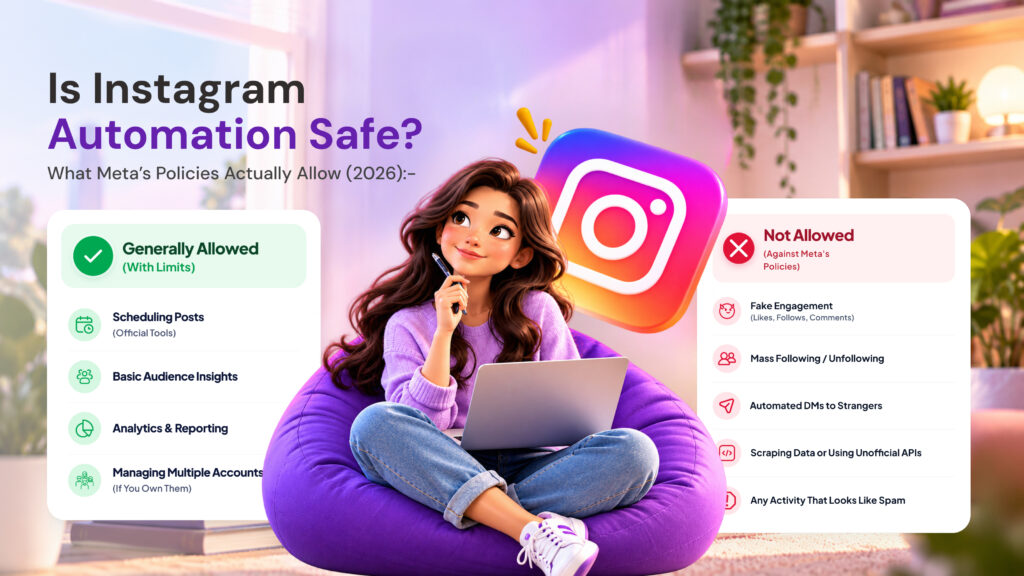
The Meta API (accessed through Meta’s Graph API and Instagram’s Messaging API) is the sanctioned way to build automation, and it explicitly supports:
- Automated replies to comments and DMs — instant responses triggered by keywords, first-time senders, or specific interactions
- Scheduled publishing — posting content at set times without manual action
- Story mention and reply handling — automated responses to Story interactions
- Lead capture and tagging — organizing conversations by what a user engaged with
- Multi-account management — for agencies and businesses running several Instagram accounts through one dashboard
Every one of these is a documented, supported use case — not a workaround or a gray area. When a tool like AutoPubliX connects “through the official Meta API,” this is specifically what that means: the automation is running through channels Meta built and maintains for exactly this purpose.
What’s Actually Banned
Meta’s automation restrictions target specific behaviors, not automation as a category:
Password-based access. Any tool asking for your Instagram username and password directly (rather than routing you through Instagram’s own OAuth login screen) is operating outside Meta’s sanctioned access methods — even if the automation itself seems harmless. This is a Terms of Service violation regardless of what the tool does with that access.
Fake engagement. Automated likes, follows, comments, or engagement designed to simulate interest from real users — this includes “engagement pods,” auto-liking bots, and mass auto-following/unfollowing scripts, all of which Meta actively detects and penalizes.
Scraping private data. Pulling data from accounts or content that isn’t publicly accessible, including attempting to access follower lists, private posts, or DMs that aren’t yours.
Rate-abusive behavior. Sending an unnaturally high volume of messages, comments, or actions in a short window — even through legitimate channels — can trigger automated enforcement, since it resembles bot behavior regardless of intent.
Browser automation / bot emulation. Tools that don’t use the official API at all, and instead control a browser to click through Instagram exactly as a human would, sit in the riskiest category — they’re harder for Meta to distinguish from malicious bots, and enforcement here tends to be aggressive.
The Real Risk Isn’t “Using Automation” — It’s the Access Method
This is the part most people get backwards. It’s tempting to think the safest approach is “automate less” — fewer replies, lighter usage, keep it under the radar. But that’s not actually what determines risk.
What determines risk is how the tool connects to your account, not how much it does. A tool using the official API sending 500 automated replies a day is safer than a password-based tool sending 5. Meta’s enforcement systems are built around detecting unauthorized access patterns, not simply flagging “high automation volume” from properly authorized integrations.
This is why the single most important question to ask before connecting any tool isn’t “how much will this automate” — it’s “does this use Instagram’s official login, or does it ask for my password?”
How to Check If a Tool You’re Considering Is Compliant
A few concrete things to look for before connecting your account to any automation tool:
The login screen. A compliant tool redirects you to Instagram’s or Facebook’s own login page, where you see Instagram’s actual branding and URL, and you approve specific permissions. If a tool instead shows you a form on its own site asking for your Instagram username and password, that’s disqualifying on its own.
What permissions it requests. Instagram’s OAuth screen tells you exactly what the tool can access — messages, comments, content publishing, and so on. A compliant tool only requests what it actually needs for the features it offers; be cautious of a tool requesting broad permissions unrelated to its stated function.
Whether it discloses its API status. Legitimate providers are generally upfront about being built on Meta’s official API, since it’s a selling point, not something to hide. Vague or evasive answers to a direct question about this are a red flag.
Reviews mentioning account restrictions. A pattern of user reports about suspensions or restrictions tied to a specific tool is a strong signal, regardless of what the tool’s own marketing claims.
What Happens If Your Account Gets Flagged
Meta’s enforcement isn’t always an instant ban — it typically escalates:
Temporary action blocks. A short-term restriction on specific actions (commenting, messaging, following) — usually the first sign something triggered automated detection, often resolving on its own within hours to a few days if the behavior stops.
Feature restrictions. Longer-term limits on specific account capabilities, which can affect reach and messaging ability even without a full suspension.
Account suspension. The most severe outcome, generally reserved for repeated or serious violations — sustained password-sharing access, confirmed fake engagement schemes, or scraping activity.
If you’re ever unsure whether a restriction was caused by an automation tool, the fastest diagnostic is checking whether that tool uses OAuth login — if it does, a triggered restriction is more likely a rate or content issue you can adjust, not an access-method violation that puts the account at fundamental risk.
Automation That’s Safe by Design
To bring this back to something concrete: here’s what compliant automation actually looks like in practice, using the same categories covered in our Instagram DM automation guide:
- Comment-to-DM automation through the official API — someone comments a keyword, they get an automated DM, all routed through Instagram’s sanctioned messaging infrastructure
- Scheduled posting across Instagram, Facebook, and other platforms through each platform’s own publishing API — see our multi-platform scheduling guide for how this works day-to-day
- Welcome messages and FAQ auto-replies triggered by real user actions, not synthetic engagement
- Lead tagging and contact organization based on actual conversations, not scraped or purchased data
None of this resembles the banned behaviors above — it’s automation built the way Meta intended it to be built.
Common Myths About Instagram Automation Safety
A few misconceptions come up often enough to address directly:
“Automation is inherently against Instagram’s Terms of Service.” Not true. Meta’s own developer platform exists specifically to support automated messaging, publishing, and engagement handling for businesses — the Terms of Service restrict unauthorized access methods, not automation as a concept.
“Using automation makes my account look less authentic.” This conflates two separate things: how you connect a tool (the compliance question) and how your replies sound (a tone and design choice). A DM automated through the official API can be just as natural-sounding as one typed manually — authenticity is about the message content, not the delivery mechanism.
“If a tool is popular, it must be safe.” Popularity isn’t a compliance signal. Plenty of widely-used growth and engagement tools operate outside Meta’s sanctioned methods and have caused mass suspensions when Meta tightened enforcement — user count says nothing about access method.
“Free tools are riskier than paid ones.” Price has no bearing on compliance either. Some free tools are properly built on the official API; some expensive ones aren’t. The login screen is still the only reliable signal.
“Once Meta bans a method, it’s banned for everyone using it immediately.” Enforcement isn’t always instant or uniform — some non-compliant tools operate for extended periods before Meta’s detection catches up. The absence of a problem so far isn’t evidence that an access method is actually safe; it just means enforcement hasn’t reached that particular case yet.
A Closer Look at Rate Limits {#rate-limits}
Even fully compliant, API-based automation operates within rate limits Meta sets at the platform level — these aren’t secret or arbitrary, they’re part of the same developer documentation that governs the API itself. In practice, this means:
- Messaging APIs cap how many messages can be sent within certain windows, tied to your account’s engagement history and API usage tier
- New accounts or newly-connected integrations typically start with lower limits that increase as usage patterns establish trust
- Legitimate tools handle this automatically — a properly built integration paces sending to stay within limits rather than attempting to send everything instantly
The practical implication: if you’re evaluating a tool and it makes no mention of rate limits or pacing at all, that’s often a sign it either isn’t built on the official API (and is trying to move faster than Instagram’s systems expect), or hasn’t been built with enough attention to how Meta’s infrastructure actually works.
FAQs
Can Instagram automation get my account banned?
Only if it uses non-compliant access methods — password-sharing, browser bots, or fake engagement. Automation built on the official Meta API with OAuth login is within Meta’s own guidelines.
Is it against Instagram’s rules to automate DM replies?
No — automated DM replies through the official API are an explicitly supported use case, not a policy violation.
Why do some automation tools ask for my Instagram password?
Usually because they weren’t built on the official API and are relying on workarounds instead — this is the single biggest red flag when evaluating any automation tool.
Does automating too much increase my risk of restriction? Volume matters less than access method. A compliant, API-based tool can run high volumes safely; a non-compliant tool is risky even at low volume.
How can I tell if a tool I’m already using is compliant? Check how you originally logged in — if you were redirected to Instagram’s own login screen and asked to approve permissions, that’s OAuth (compliant). If you typed your password into a form on the tool’s own website, that’s not.
Will my followers know my replies are automated? Not inherently — well-built automation can feel natural and immediate. Whether it “feels automated” is a design and tone choice, separate from whether it’s policy-compliant.
Are all engagement automation tools risky? No — the risk is specific to fake engagement (auto-liking, auto-following, engagement pods), not to automating genuine responses to real user actions like comments and messages.
What’s the safest way to start automating my Instagram account? Choose a tool that explicitly states it uses the official Meta API and routes login through Instagram’s own OAuth screen, start with a small set of triggers (a welcome message, 2-3 keyword replies), and expand from there once you’ve confirmed it’s working as expected.
Ready to automate the compliant way? See how AutoPubliX connects through Instagram’s official API — start free for 14 days, no payment today.